Your voice, in the app
they already open.
Upload the meditation, the pep talk, the workshop somebody wanted on the drive. It plays in your community with speed control, a sleep timer, and resume, and on Growth it also lands as a private podcast feed in Apple Podcasts or Overcast: downloaded for the flight, and listed in no directory anywhere. Every track is transcribed for you into a panel members can search, and you name the chapters. The audio library itself, transcripts included, is free on every plan.
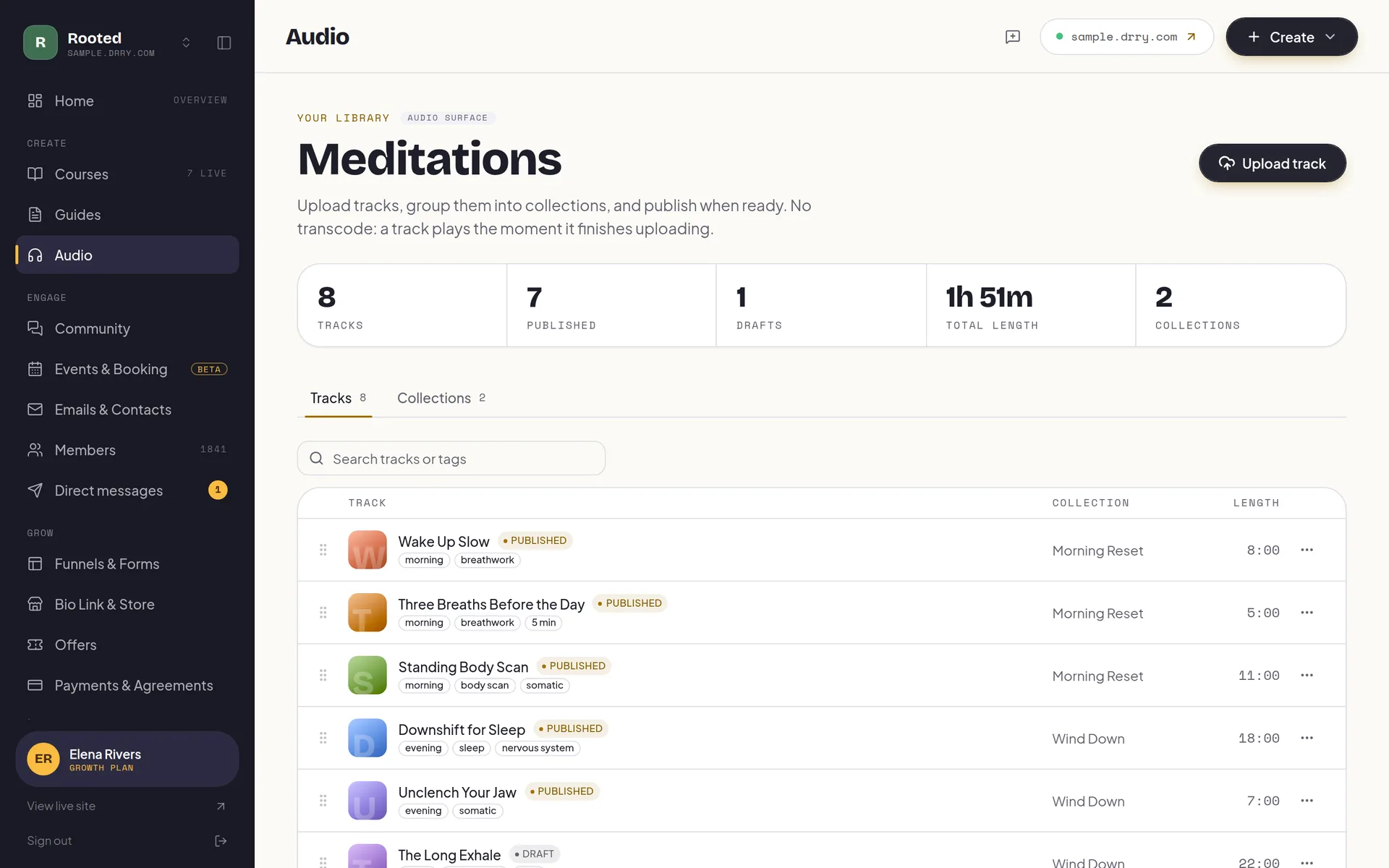
The audio add-on you don't have to buy.
Most platforms treat audio as a file you attach to something else, and then send you off to a separate paid product, wired up with Zapier, to make it playable in a podcast app. That is two subscriptions, two listener lists, and two places for a lapsed member to keep listening from. On Drry it is one upload: the player inside your community, and a private feed for the app they already open, both revoked the moment their access ends.
A player that keeps going while they read the feed, browse a course, or close the tab and come back tomorrow.
One private link per member, downloadable for the subway and unlisted everywhere else.
Everything a podcast app does, on your brand.
Audio is the only format people give you their commute for, and it is the format most platforms treat as an attachment. Yours gets a real player: lock-screen controls, six speeds, a sleep timer, resume that survives closing the tab, and a queue that keeps going through the collection. No transcode wait either, a track is live the moment it finishes uploading.
Lock-screen controls
Title, collection, and artwork on the lock screen, with play, pause, and skip from the steering wheel or the headphone button. Nobody unlocks a phone mid-run.
A private podcast feed
One personal, revocable link per member that subscribes in Apple Podcasts, Overcast, or Pocket Casts. It carries itunes:block, which tells directories not to list it, and it is a switch you turn on, not a default.
A player that follows them
The dock lives in the frame, not the page. They can read the community feed or open a lesson and the audio keeps playing.
0.75x to 2x
Six speeds, remembered between sessions, and shared with the course video player so their pace carries across everything you publish.
A sleep timer
Fifteen, thirty, forty-five, sixty minutes, or the end of this track. The one control a wind-down library lives or dies by.
Autoplay through the collection
When a track ends the next one starts, in the order you arranged. Resume is saved per member, so tomorrow picks up mid-sentence.
Pull the audio out of a lesson
One button on any course lesson strips the video to an mp3 and files it in the library. The workshop they could only watch becomes the walk they can take.
Collections you arrange
Group tracks into a series, drag them into order, give each a cover, and rename the whole tab to Meditations, Recordings, or Podcast.
A transcript, written for you
Publish a track and it is transcribed automatically, on every plan including free. Members get a panel under the player they can search, and every line is a tap to that second, so a forty-minute recording becomes something you can look things up in. The machine mishears your vocabulary the same way every time, so the wording is yours to correct once, in the editor, and a corrected transcript is never overwritten.
Chapters you name yourself
Mark where a long track turns: the settle, the practice, the close. Members jump to the part they came back for instead of scrubbing for it, and the chapter list sits beside the transcript in the same panel.
Feeds go everywhere.
The data comes back.
This is the trade the whole category makes and nobody talks about. A podcast host can tell you a file was downloaded, and then the trail ends, because an anonymous RSS pull carries no playback telemetry: it cannot tell a finished episode from one that auto-downloaded overnight and was never opened. The vendors who do have real per-person play-through got it by giving up podcast apps entirely and keeping everyone in their own player.
Drry keeps both, because the web player stays primary and the feed is additive. Members who want the app get the app; the ones listening in your community leave you a real record. You see who pressed play, what share finished, and which members those were.
- Listeners
- The named members who pressed play on a track, not an anonymous download count that a background refresh can inflate.
- Completion rate
- What share of the people who started a track reached the end of it, per track, so you can tell the ten-minute one that lands from the forty-minute one that does not.
- Finished
- The named members who reached the end. Measured on real playback, so dragging the scrubber to the finish is not recorded as having listened.
Listen data is recorded on every plan, including free. The dashboard that reads it back to you, track by track and member by member, is part of analytics, available on the Creator plan.
Audio, answered.
Do I have to turn this on?
No, and it starts off. Private feeds are a switch in your Studio, separate from the audio tab itself, because letting members carry your library into a podcast app is a different decision from publishing it: their app downloads episodes, and a downloaded file stays on that device after their access ends. Leave it off and your audio streams in your community only. Turn it on when you want the convenience, knowing that trade.
What is a private podcast feed?
It is a personal RSS link, one per member, that they paste into Apple Podcasts, Overcast, Pocket Casts, or whatever app they already open. Your published audio then behaves like any show they subscribe to: new episodes arrive on their own, downloads work offline, and the lock screen and CarPlay controls come for free from the app. The feed carries itunes:block and a noindex header, so it can never be listed in a podcast directory, and every poll re-checks that the member still has access before a single byte is served.
What if someone downloads everything and then cancels?
Their feed stops resolving the moment their access ends, so no new episode ever arrives, and the same is true if they delete their account entirely: the link is destroyed with it. What you cannot claw back is what already finished downloading to their phone, because that file now lives in their podcast app the way any downloaded episode does. That is true of every private podcast product, and it is the trade for real offline listening. If it matters for a particular piece of work, keep that one in the library only: the in-community player streams and leaves nothing behind.
What happens if someone shares their feed link?
The member regenerates it from their own audio page, and the old link stops working on the next poll. Each link is a 256-bit token tied to one person, so replacing one never touches anyone else's. More usefully, it also revokes itself: if their membership lapses, if you remove them, if you turn the audio tab off, or if the community is suspended, the feed stops resolving without anyone doing anything. Removing the member is the coach-side remedy today.
Is audio free, or do I need a paid plan?
The audio library is on every plan, including free: upload tracks, group them into collections, and your members get the full player with speed, a sleep timer, resume, and autoplay. The analytics dashboard, where you see who listened and who finished, starts on Creator ($29/mo). Private podcast feeds are on Growth ($99/mo).
How long can a track be?
There is no per-file limit any more, so a ninety-minute workshop recording is fine. The only bound is your plan's storage, which is shared across your videos, attachments, and audio, and the settings page shows exactly where it is going. Audio needs no transcode either: it streams the moment the upload finishes, unlike video.
Can I turn my course videos into audio?
Yes. Any course lesson with video has an Add to audio library button that strips the video to an mp3 and files it as a draft track for you to title and publish. It is the cheapest content you will ever make: the recording already exists, and the version people can take on a walk usually gets finished more often than the one that needs a screen.
Do my tracks get transcribed?
Yes, automatically, on every plan including free. When you publish a track we transcribe it, and members get a panel under the player they can search, with every line a tap to that second. You can correct the wording in the console if a term of art comes out wrong, and once you have edited a transcript we never overwrite it with a fresh machine pass unless you ask for one. Transcripts are not a paid feature and not a separate tool: they are simply there, next to the play button.
Can I add chapters to a track?
Yes, and you write them yourself rather than accepting whatever a machine guessed. Mark the moments a long track turns, give each one a name, and members jump straight there. Chapters sit beside the transcript in the same panel under the player, so a ninety-minute workshop is browsable instead of a single bar to scrub.
Do I have to call it Audio?
No. The tab is yours to name: Meditations, Recordings, Sessions, Podcast, Audiobook. You can also switch the whole surface off if audio is not part of what you do, and switch it on the day it is. Same for the headline and the empty-state copy your members read.
Start free. Pay only when you have grown.
No trial countdown, no card up front. The free tier carries you from your first member to a real, paying community.
Everything you need to open the doors and welcome your first members.
- 100 members
- Unlimited courses
- Unlimited guides: recipes, workouts, how-tos
- Unlimited audio streaming
- A members' library for files and downloads
- Community
- Event calendar, plus a booking page with 1 session type
- 1 funnel with view counts
- 1 capture form (waitlist, lead magnet, or contact)
- 5 GB storage
- Accept payments, 0% fee
- Bio link store: 10 digital products, 0% fee
- 1:1 and package payment links, one-time, 0% fee
- Up to $500 a month in earnings
- 700 emails a month
- New-content emails to members
- Automatic captions and transcripts
Your own domain, your own brand, and at-risk member detection: see who is quietly drifting away before they go.
- Everything in Free, plus:
- Your own .com, free one per account Terms apply
- Up to 3 communities on one plan, sharing one allowance
- Member retention dashboard
- White label your site (no Drry branding)
- Custom domain
- Unlimited members
- 50 GB storage
- Unlimited funnels and forms with conversion analytics
- Unlimited digital products in your store
- Unlimited session types on your booking page
- Drry-hosted meetings, 20 participant hours included each month
- Client payment plans, and signed agreements
- Free trials for new members
- 60,000 emails a month
- Email automations (welcome, nurture, win-back)
- Import your whole contact list from a CSV
- 90 days of analytics history
Room to scale: unlimited members and 1 TB of storage, with AI moderation and team seats for the admins and editors who help you run it, so it never has to run by hand.
- Everything in Creator, plus:
- Membership tiers: sell up to 3 levels from one community
- 200,000 emails a month
- Webinars, plus 50 participant hours and 150 viewer hours each month
- AI meeting notes: a transcript and a written recap
- White label your email (send from your own domain)
- Private podcast feeds
- 1 TB storage
- AI community moderation
- Team access
- Full analytics history
- Your own Meta, Google and TikTok pixels
We never take a cut of your member payments, you keep 100%. You only pay Stripe's standard card fee (about 2.9% + 30 cents), the same fee any business pays.
Custom Plans
Need more members, custom support, or help migrating off another platform? Tell us what you are running and we will put a plan together around it.
Press record. They'll press play.
Start your community free, with the audio library included and no card. Add the private feed when your members start asking where they can listen on the drive.